
pCloud vs Proton Drive (2026): Which Is Better?
Compare pCloud and Proton Drive on encryption, lifetime pricing, collaboration, storage, and European data residency before choosing your cloud.
Verdict
The split is clean. pCloud wins on media, capacity and lifetime economics: one payment, up to 10 TB, a real Linux client. Proton Drive wins on architecture and suite integration: end-to-end encryption by default across files and filenames, plus encrypted Docs and Sheets. Buy pCloud for archives, Proton for confidential work.
Best for
- Archives of 500 GB or more you expect to keep for years (pCloud)
- Media libraries that need in-browser playback (pCloud)
- Confidential files you do not want to sort into an encrypted folder (Proton Drive)
- Existing Proton subscribers with unused storage in the bundle (Proton Drive)
Avoid if
- You need Google Workspace class collaboration from either service
- You need a Linux desktop sync client from Proton Drive
- You need more than 200 GB on Proton's standalone Drive Plus plan
Sources and prices checked 16 September 2026
Check the current pCloud Lifetime priceSome links are affiliate links. Learn more

Quick answer: In this pCloud vs Proton Drive comparison, choose pCloud for a large personal archive, polished media tools, and a lifetime plan that can eliminate recurring storage fees. Choose Proton Drive when zero-knowledge encryption across your files and filenames matters more than storage volume. Proton also offers private Docs and Sheets.
pCloud and Proton Drive are both operated by Swiss companies. The main difference is who can decrypt your files: pCloud's standard storage uses provider-managed encryption, while Proton Drive encrypts your content before upload.
pCloud's standard storage is designed for convenience, media playback, file recovery, and value. Its optional Crypto folder adds client-side encryption. Proton Drive encrypts file contents, filenames, and folder names before they leave your device by default. That stronger privacy baseline comes with less storage on the standalone plan and no lifetime purchase.
How we compared them: This comparison uses official documentation reviewed on 5 September 2026 and the pricing snapshots shown below. We have not run comparative speed tests or independently audited either service's encryption. Recommendations weigh privacy, cost, apps, sharing, and recovery. Prices vary by currency and billing cycle; confirm the total and renewal terms at checkout.
About the images: The header combines excerpts from the providers' pricing and security webpages. Pricing screenshots document offers, while app screenshots below illustrate specific controls. They are not evidence of upload speed or an independent security test.
Affiliate disclosure: Built in EU may earn a commission if you buy through the pCloud or Proton links in this article, at no extra cost to you. Affiliate status did not determine the comparison criteria or verdict.
Already know your priority? Explore pCloud lifetime storage for a large archive, or try Proton Drive for encryption across your files. These are affiliate links; technical source links below go directly to the documentation.
Is pCloud or Proton Drive better in 2026?
For most people choosing between these services, the answer depends on one question: are you optimizing for long-term storage value or privacy by default?
| Decision factor | pCloud | Proton Drive |
|---|---|---|
| Best for | Large archives, media, lifetime value | Sensitive files, private collaboration |
| Company | pCloud International AG, Switzerland | Proton AG, Switzerland |
| Free storage | Up to 10 GB after unlock actions | 2 GB initially; up to 5 GB after onboarding |
| Standalone paid storage | 500 GB, 2 TB, or 10 TB lifetime options | 200 GB Drive Plus |
| Private encryption | Optional Crypto folder | Default for files, filenames, and folder names |
| Lifetime plan | Yes | No |
| Data location | Choose Luxembourg or Dallas | Switzerland, Germany, and Norway |
| Document collaboration | Shared-file workflow; no simultaneous document editing | Encrypted Proton Docs and Sheets |
| Source transparency | Selected open-source SDKs and console client | All apps open source; audits published |
| Media features | Built-in audio and video playback | Photo backup, albums, and video support |
| File version history | 30 days on paid plans; 365-day paid add-on | Configurable up to 200 versions per file for up to 10 years on paid plans |
Which one wins each category?
| Category | Winner | Why it wins |
|---|---|---|
| Privacy by default | Proton Drive | End-to-end encryption covers every stored file and key metadata without a separate add-on |
| Long-term storage value | pCloud, if used for years | Lower five-year storage cost at the illustrated prices; requires paying upfront |
| Large personal archives | pCloud | Individual lifetime tiers reach 10 TB and include media-focused tools |
| Private document collaboration | Proton Drive | Proton Docs and Sheets support encrypted real-time editing |
| Media playback | pCloud | Native audio and video playback make it the more practical media library |
| Version recovery | Proton Drive | Paid plans can retain up to 200 versions for as long as 10 years |
| Linux desktop workflow | pCloud | pCloud offers a mature Linux desktop client; Proton now offers a Linux CLI but not an equivalent desktop interface |
These are recommendations based on documented features, not performance scores. A lower lifetime cost matters only if the capacity fits and you keep using the service.
Who operates pCloud and Proton Drive?
pCloud was founded in 2013. Its operator, pCloud International AG, lists its address in Baar, Switzerland. Proton launched in 2014; Proton AG is based in Geneva, Switzerland, with the non-profit Proton Foundation as its primary shareholder. Both companies are European and based outside the EU. Company location does not tell you where every file is stored.
The table describes product direction rather than every plan detail. Business plans add controls and pricing that deserve a separate evaluation.
Their transparency models also differ. Proton publishes the source for all its apps and links to independent audits. pCloud publishes selected SDKs and a console client, but it does not make the same all-app open-source commitment.
pCloud vs Proton Drive, in 60 words
pCloud is the stronger value choice for large, long-lived archives: it offers lifetime plans, a virtual drive, media playback, and up to 10 TB. Proton Drive is the stronger privacy choice: files and filenames are end-to-end encrypted by default, and private Docs and Sheets are included. pCloud requires its separate Crypto product for comparable client-side protection.
When should you choose pCloud?
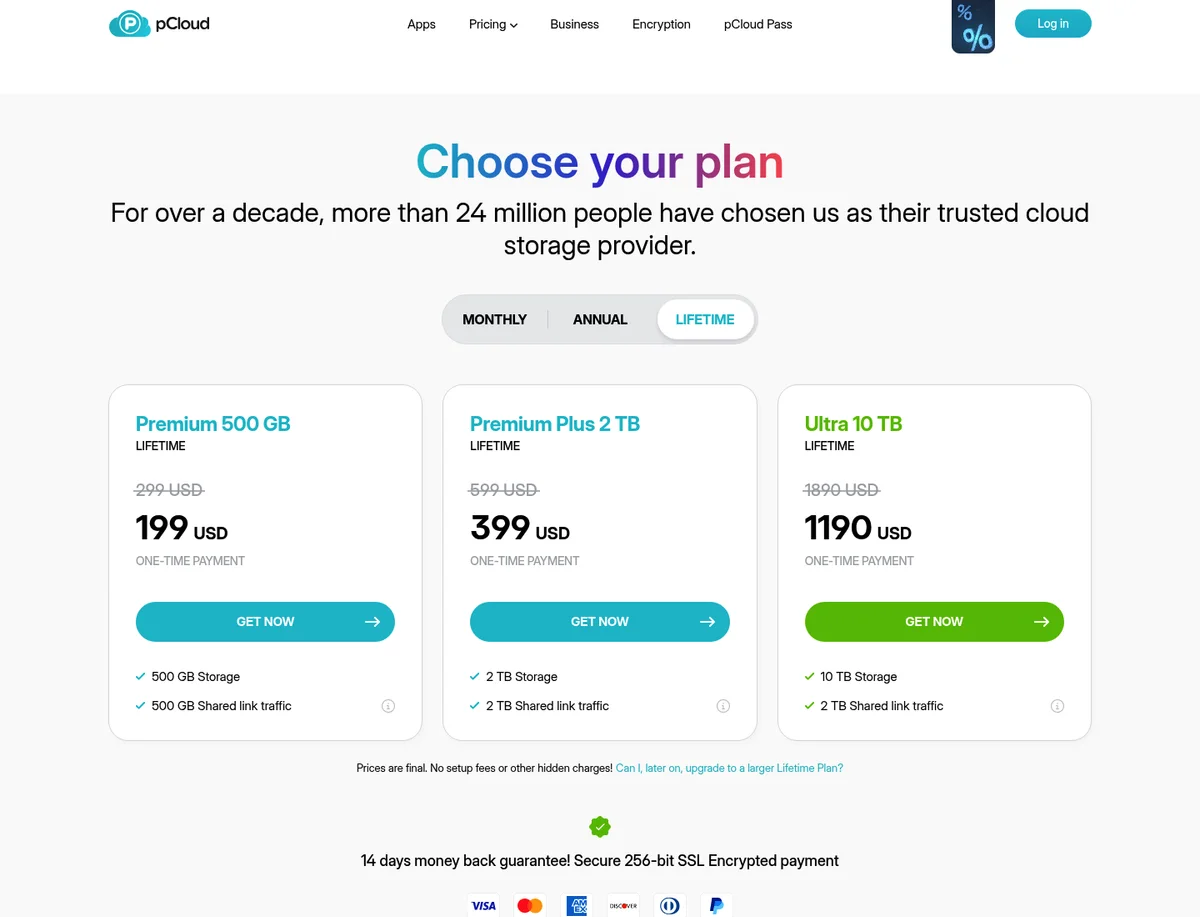
Choose pCloud when recurring storage subscriptions are the problem you most want to solve. Its pricing page listed one-time lifetime purchases at three capacities when last checked: 2 TB at US$499 (promo, was US$709, checked 16 Sep 2026), with 500 GB and 10 TB tiers either side of it. All three appear with their sources in the table further down. These were displayed promotional prices, not a promise that the same offer will always be available. pCloud's listed prices rose since our original review; every figure in this comparison reflects our pricing dataset checked on 16 Sep 2026. See pCloud's current storage offers.
The economics are straightforward. Spread over five years, that 2 TB lifetime price works out to about USD 8.32 per month. Spread over eight years, it falls to roughly USD 5.20. Under pCloud's terms, a lifetime plan lasts for the account owner's lifetime or 99 years, whichever is shorter. That is still not a backup guarantee. Keep a second copy of irreplaceable files regardless of provider.
pCloud is also a good fit for photographers, video collectors, and people with small laptop drives. Its virtual-drive desktop app exposes cloud files without storing every file locally. Built-in audio and video players make it more useful as a media library than many privacy-first competitors.
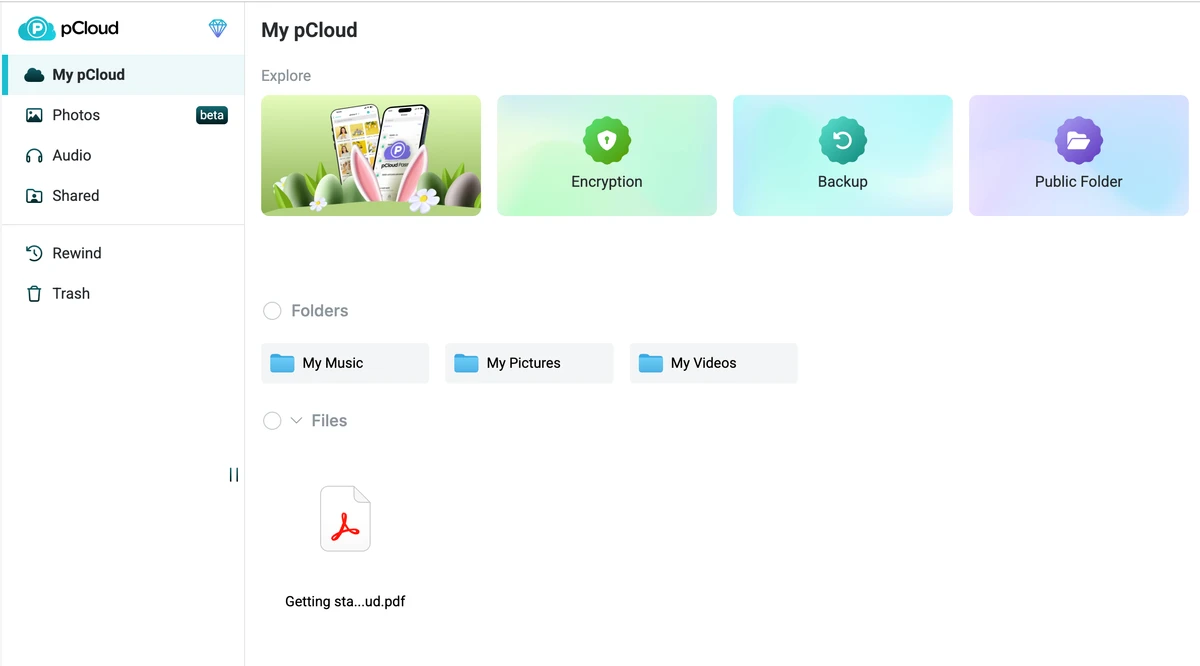
Read our pCloud review for more interface examples and plan details, or inspect the pCloud product profile.
pCloud — Swiss cloud, lifetime plans
EU data residency in Luxembourg, one-time payment plans, zero-knowledge encryption (optional).
Affiliate partnership — we may earn a commission at no cost to you.
What is the privacy catch with pCloud?
pCloud's standard storage and pCloud Encryption are not the same security model. The standard service uses TLS in transit and AES-256 server-side protection. pCloud Encryption creates a Crypto folder where files are encrypted on your device and only you hold the key.
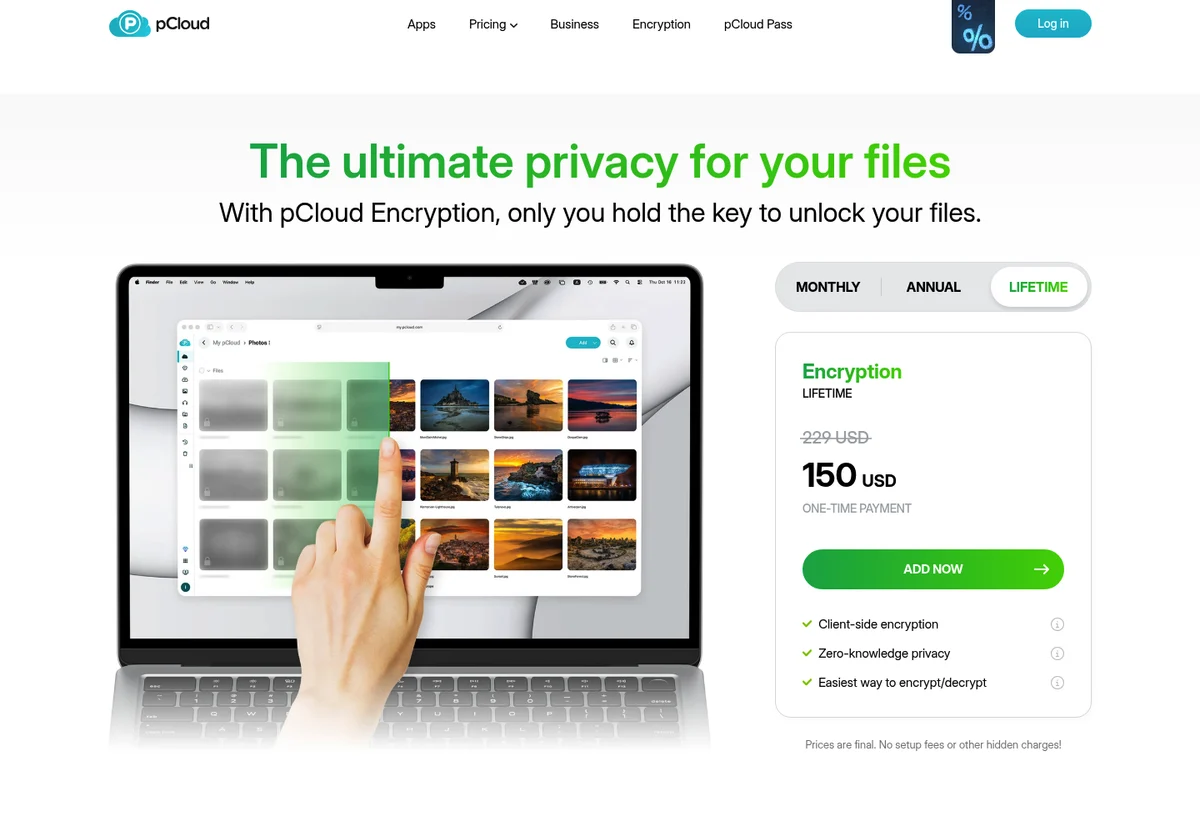
The official Encryption page listed Crypto at USD 150 lifetime in our 16 Sep 2026 dataset capture. That means the comparable pCloud privacy setup is the storage plan plus Crypto, and only files placed inside the Crypto folder receive that protection. This split is useful if you want media previews and server-side features for ordinary files, but it requires deliberate file organization.
Where does pCloud store your data?
pCloud offers Luxembourg and Dallas data regions. Its data-region documentation says files, account metadata, and backups remain in the selected region unless you authorize a change. Moving later costs USD 19.99. However, pCloud's help center says region selection is still rolling out and may not be available in every country. If European residency is required, confirm that Luxembourg is offered before buying or uploading data.
Check the region in your account before uploading. Swiss headquarters alone do not mean your files are stored in Europe.
When should you choose Proton Drive?
Choose Proton Drive when the files themselves are sensitive and you do not want to decide which folder deserves client-side encryption. Proton says file contents, filenames, folder names, and thumbnail previews are encrypted before upload. Its Drive privacy policy says Proton can see operational fields such as creation and modification times, permissions, and the uploading username. Proton stores the encrypted file size, while obscuring the original unencrypted size.
That architecture is the main reason to pay for Proton Drive. It reduces what the provider can disclose or inspect because Proton does not hold the keys needed to read your content. Proton's privacy policy says Drive data is stored on company-owned servers in Switzerland, Germany, and Norway. The service is available on the web, Windows, macOS, Android, and iOS. Proton offers an official command-line client for Linux, but not yet an equivalent desktop sync interface.
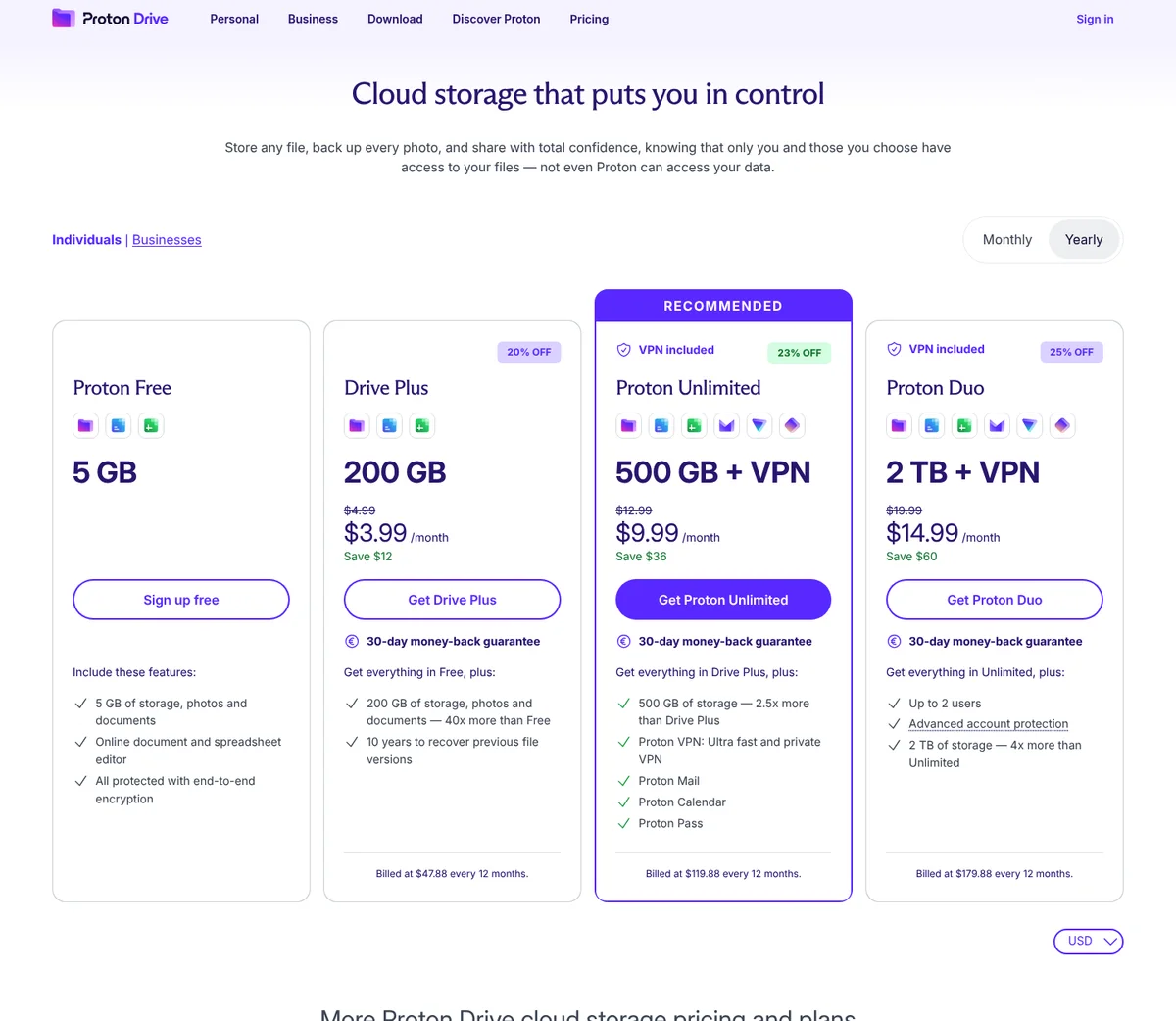
Proton's individual pricing page lists 200 GB for Drive Plus at US$47.88 (list, checked 16 Sep 2026) on annual billing. Unlimited (500 GB) and Duo (2 TB shared by two users) appear at their annual rates in the table below. Divided by twelve, those totals give the USD 3.99, USD 9.99 and USD 14.99 monthly figures Proton headlines on its page. They require paying for a year, not one month. The page's 5 GB free headline includes an onboarding bonus above the initial 2 GB. Explore Proton Drive's free and paid options.
Learn more on the Proton Drive product profile, then compare the wider market in our guide to the best European cloud storage services.
Proton Drive — encrypted cloud storage
Zero-knowledge Swiss storage. Only you hold the keys — not Proton, not Google, not a US cloud.
Affiliate partnership — we may earn a commission at no cost to you.
Is Proton Drive now useful for collaboration?
Yes, within a narrower scope than Google Workspace or Microsoft 365. Proton Drive includes Proton Docs and Proton Sheets, with real-time editing while preserving end-to-end encryption. Public links can grant viewer or editor access, and recipients can edit documents or upload to shared folders without a Proton account.
An editor link lets its holder change content, so grant viewer access when someone only needs a copy. Public-link editors can see the sharer's account email. Use non-sensitive sample files to test collaboration before sharing real work.
The trade-off is ecosystem breadth. Teams that depend on complex presentations, mature workflow automation, broad third-party integrations, or advanced spreadsheet behavior should test their real files before migrating.
How do pCloud and Proton Drive handle recovery and sharing?
Proton has the longer documented retention window for individual file versions. pCloud's Rewind helps recover folders from an earlier point in time. These solve different recovery problems: version history is not a promise to restore an entire account after every failure. Test restoration before treating either service as your only copy.
pCloud offers shared links, password protection, and file requests, plus 30-day recovery on paid plans. Its Extended File History add-on extends trash, revisions, and Rewind to 365 days, but it is not retroactive. pCloud also confirms that simultaneous document editing is unsupported. Invited-folder collaboration is restricted to users in the same data region, although shared links work across regions.
Proton Drive supports public links, email invitations, passwords, expiry dates, viewer and editor roles, and uploads to shared folders. Proton's version-history documentation says paid Drive plans can retain up to 200 versions for as long as 10 years. The free plan retains up to 10 versions for seven days.
Proton's 10-year figure is a configurable maximum, subject to the 200-version limit per file. Check your version-history settings; do not read the pricing headline as unlimited revisions or guaranteed recovery of permanently deleted data. Keep a separate backup with either provider.
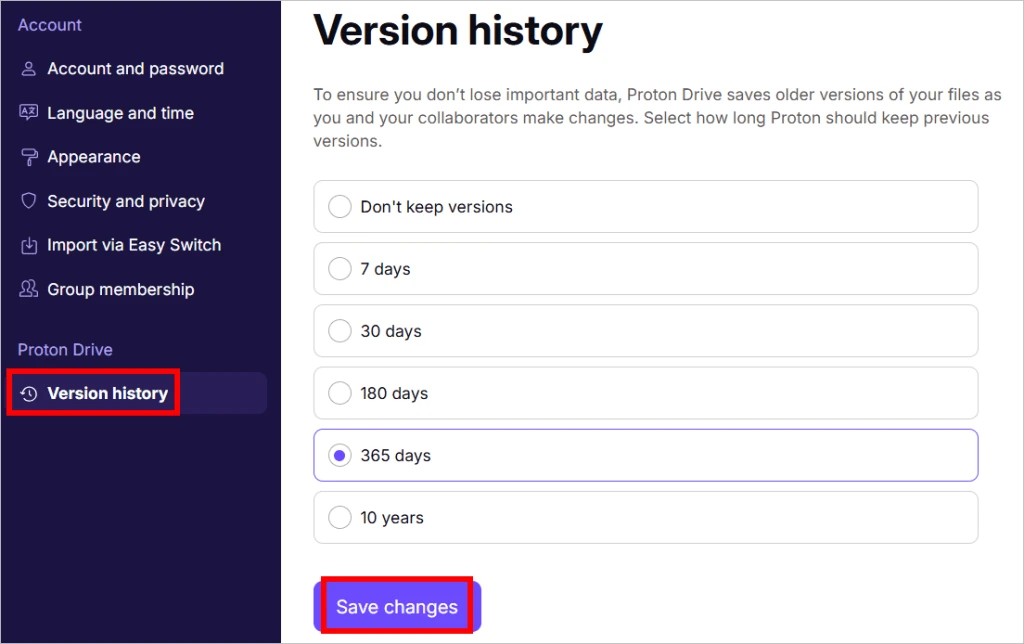
Image source: Proton's version-history instructions. This is the provider's interface example, not a screenshot from our account.
Which is cheaper over five years?
At the illustrated rates, pCloud costs less over five years for 500 GB or 2 TB. Proton Drive Plus costs less upfront and includes encryption throughout its 200 GB allowance. The table below is generated from our pricing dataset, holds prices constant for five years, excludes optional recovery add-ons, and does not forecast renewal prices.
| Plan | Storage | Billing | Price | E2EE included | Source |
|---|---|---|---|---|---|
| Premium 500 GB Lifetime | 500 GB | Lifetime | US$219 (promo, was US$279) | No | source |
| Premium Plus 2 TB Lifetime | 2 TB | Lifetime | US$499 (promo, was US$709) | No | source |
| Drive Plus 200 GB Annual | 200 GB | Annual | US$47.88 (list) | Yes | source |
| Proton Unlimited | 500 GB | Annual | US$119.88 (list) | Yes | source |
| Proton Duo | 2 TB | Annual | US$179.88 (list) | Yes | source |
Per our dataset checked on 16 Sep 2026, pCloud's Crypto add-on is a flat USD 150 lifetime purchase on top of any storage plan, so a 500 GB plan plus Crypto totals USD 369, and a 2 TB plan plus Crypto totals USD 649. Multiply Proton's annual price by five for its five-year total: Drive Plus reaches USD 239.40, Unlimited reaches USD 599.40, and Duo reaches USD 899.40.
The calculator below reproduces the 2 TB pCloud-with-Crypto scenario against Proton Drive and Proton Duo, both at the same 2 TB threshold. Drive Plus tops out at 200 GB, so it shows as unavailable at that capacity; Duo appears instead, its 2 TB allowance shared by up to two users as part of the wider Proton suite.
| Plan | 3 years | 5 years | 10 years |
|---|---|---|---|
| pCloud 2 TB LifetimePrice shown after a site-wide promotional discount.+ pCloud Encryption (Crypto): US$150 | US$649 | US$649 | US$649 |
| pCloud 2 TB annual+ pCloud Encryption (Crypto): US$150 | US$449.97 | US$649.95 | US$1149.90 |
| Proton (suite) 2 TB annual (covers 2 users; shared 2 TB)Page showed "25% OFF Proton Duo 2 TB + VPN $19.99 $14.99/month" with the monthly list price struck through; no separate annual list total is shown. Billed at $179.88 every 12 months. | US$539.64 | US$899.40 | US$1798.80 |
| Proton Drive: Proton Drive has no USD single-user plan covering 2000 GB. | |||
Prices checked between 16 Sep 2026 and 16 Sep 2026, in USD; sources linked per row.
- pCloud 2 TB Lifetime costs less than pCloud 2 TB annual from year 5.
- pCloud 2 TB Lifetime costs less than Proton (suite) 2 TB annual (covers 2 users; shared 2 TB) from year 4.
Some links above are affiliate partnerships; we may earn a commission at no cost to you. See our affiliate policy.
Dividing USD 649 by Duo's USD 179.88 annual rate gives about 3.61 years. Because Duo is billed annually, its cumulative payments exceed that lifetime purchase at the fourth annual payment. This compares spending, not equivalent benefits: Duo serves two people and includes the Proton suite; the individual pCloud plan does not.
For someone who needs no more than 200 GB, Drive Plus totals USD 239.40 over five years, below pCloud's smallest lifetime plan plus Crypto at USD 369. If you already pay for Unlimited or Duo and have enough unused storage, Drive may cost you nothing extra. If you only need storage for a year, compare annual subscriptions before committing to any lifetime plan.
Can you use pCloud and Proton Drive together?
Yes, if the distinction is useful to you. One possible setup puts non-sensitive media in pCloud and confidential working files in Proton Drive. Family photos and videos can also be sensitive; choose encryption based on their contents, not just their file type. Maintain an offline or independent backup for both.
The downside is operational complexity. Two sync clients, two sharing systems, and two recovery processes create more work. Use the split only if you can define a clear rule for where files belong.
For a broader field, browse the European cloud storage category. This article compares personal plans; business requirements such as administrator access, retention policies, and contractual storage location need a separate evaluation.
What should you test before paying or moving your files?
Try the same small set of non-sensitive files in both free accounts. A PDF, a photo, a video, and a spreadsheet will reveal more about your workflow than a feature checklist. Allow around 30 minutes for basic checks, plus upload time; this is a suggested test, not a measured migration estimate.
- Upload the sample files from your usual computer and open them on your phone. Check previews and formatting.
- Make a file available offline, disconnect, and confirm it opens. A visible cloud file is not necessarily a downloaded copy.
- Open a viewer link in a signed-out browser. Check permissions and what identifying information the recipient sees.
- Change a sample file, then restore its earlier version. Separately delete and restore a disposable sample to understand Trash.
- For pCloud, confirm your data region and test Crypto separately if you intend to buy it. Standard-folder behavior does not establish Crypto compatibility.
- Download your samples again and compare them with the originals. Keep your existing storage until your full transfer and backup are verified.
Set up account and data recovery before uploading anything irreplaceable. Proton's recovery guidance distinguishes the two. pCloud's terms warn that a lost Crypto passphrase cannot be restored by the provider.
What is the final verdict?
pCloud is the better value choice when you need at least 500 GB, expect to keep the service for years, and prefer mature desktop, Linux, or media workflows. Its main caveats are equally important: private client-side encryption costs extra, it applies only inside the Crypto folder, and European residency requires confirming that Luxembourg is available and choosing it. A lifetime purchase also concentrates provider-longevity risk into one upfront payment.
Proton Drive is the privacy-by-default winner. It has the cleaner encryption model and a growing private productivity suite. It is especially attractive to existing Proton customers because storage sits inside a broader subscription rather than as an isolated purchase.
Our recommendation:
- Choose pCloud for lifetime value, 2 TB or larger archives, media, and virtual-drive workflows.
- Choose Proton Drive for sensitive files, default end-to-end encryption, and encrypted document collaboration.
- Choose neither without testing if advanced team collaboration or regulated administration is the primary requirement.
Explore pCloud lifetime storage or start with Proton Drive. Both links support Built in EU through our affiliate partnerships. Try your actual workflow before paying.
Frequently asked questions about pCloud vs Proton Drive
Is pCloud or Proton Drive more private?
Proton Drive is more private by default because it applies end-to-end encryption to files and filenames across the service. pCloud offers client-side, zero-knowledge encryption inside its Crypto folder, but Crypto is an extra purchase. Standard pCloud storage uses server-side encryption.
Is pCloud cheaper than Proton Drive?
pCloud can be cheaper over several years because it sells lifetime plans, including 2 TB for a one-time USD 499 price when last verified. Proton Drive uses subscriptions and offers less storage on its individual Drive Plus plan, but includes end-to-end encryption and private document editors.
Does pCloud store data in Europe?
Yes, if Luxembourg is available and selected as your data region. pCloud also offers Dallas, Texas. Your selected region covers files, account metadata, and backups, and changing regions later carries a one-time fee. Confirm availability because region selection is still rolling out globally.
Does Proton Drive have lifetime plans?
No. Proton Drive uses monthly or annual subscriptions. Choose pCloud if avoiding recurring storage fees is the priority, while accounting for provider longevity and maintaining a separate backup.
Which is better for collaboration, pCloud or Proton Drive?
Proton Drive is stronger for private document collaboration because Proton Docs and Proton Sheets are built in and end-to-end encrypted. pCloud supports file and folder collaboration, but not simultaneous document editing.
Can I try both services for free?
Yes. Proton Drive starts with 2 GB and lets new users unlock up to 5 GB by completing onboarding steps within 30 days. pCloud provides up to 10 GB after completing account actions and referrals. Test both desktop and mobile workflows before paying.
Products Mentioned
pCloud is a Swiss-based cloud storage solution that prioritizes data privacy and security. Offering various plans, it allows users to store, access, and manage files with strong encryption and flexible sharing options.

Proton Drive is a secure cloud storage service that allows users to store, share, and collaborate on files with end-to-end encryption. It offers features like file syncing, secure file sharing, and online document editing. Proton Drive is based in Switzerland and is protected by European privacy laws.
Related Articles
Tresorit vs Dropbox: End-to-End Encryption vs Convenience (2026)
Dropbox encrypts files on their servers but holds the keys. Tresorit uses zero-knowledge encryption, only you can decrypt your files. Here's the complete security, feature, and pricing comparison.
ComparisonsProton Mail vs Gmail: Privacy & Security Comparison 2026
Google says it does not scan Gmail to show you ads. What actually changes when you switch to Proton Mail is the encryption model, the jurisdiction and the business model.
ReviewspCloud Review 2026: Swiss Cloud Storage with Lifetime Plans Worth It?
A review of pCloud's lifetime plans, optional Crypto encryption and European or US region choice, with dated pricing checks and practical trade-offs.
Ready to Switch to EU Alternatives?
Explore our directory of 400+ European alternatives to US tech products.
