
DeepL vs Google Translate: An English-to-Dutch Workflow Test
We ran 18 test messages and five context checks through DeepL and Google Translate into Dutch. Both kept every token intact. DeepL was more precise on instructions; Google sounded more natural.

Quick answer: For English-to-Dutch support text, neither tool wins outright. Both kept every URL, placeholder, filename and number intact across 18 test cases. DeepL stayed closer to the source on instructions and deadlines. Google Translate sounded more natural in tone and terminology. Both usually turned a bird "crane" into a machine when both meanings shared a passage.
A support translation can look polished while changing the one thing that matters: a condition, a deadline or a word with two meanings. We compared DeepL and Google Translate on exactly those details and checked every Dutch output for meaning, tone and terminology. All inputs and outputs are available to download.
How we tested: On September 8, 2026, we pasted identical English text into the free web versions of both translators, with Dutch as the target language, and recorded each output as returned. The screenshots below are cropped to the product interface. No translation text was edited.
Jump to: At a glance · Links and placeholders · Amounts and dates · Instructions · Tone · The crane test · Which to use · FAQs
How do DeepL and Google Translate compare for Dutch?
DeepL is the stronger choice when an English instruction or deadline must come through exactly. Google Translate produced more natural customer-facing Dutch. On literal content the two were identical: neither changed a link, placeholder, code identifier, amount or date. The differences are in meaning, register and word choice.
| DeepL | Google Translate | |
|---|---|---|
| Company | DeepL SE | Google LLC |
| Headquarters | Cologne, Germany | Mountain View, California, US |
| Version tested | Free web translator, signed out | Free web translator, signed out and later signed in |
| Links, placeholders, code, numbers | All preserved | All preserved |
| Instructions and deadlines | Matched the source in every case | Turned one instruction into a statement; changed "by Friday" to "on Friday" |
| Tone and terminology | Sometimes stiff; one unusual term; mixed quote marks | More natural register and standard terms |
| Gender-neutral source sentence | Masculine zijn and hij | zijn of haar and hij of zij |
| Bird "crane" in a mixed passage | Wrong in 3 of 3 tests | Wrong in 2 of 3 tests |
| Stronger in this test for | Internal instructions and deadlines | Customer-facing replies |
DeepL vs Google Translate for Dutch, in 60 words
DeepL, from Cologne-based DeepL SE, kept English instructions and deadlines closest to the source in our test, but its Dutch was sometimes stiff. Google Translate, from US-based Google LLC, produced more natural customer-facing wording and terminology, but changed "by Friday" to "on Friday". Both preserved every link, placeholder and number, and both struggled with an ambiguous word.
What exactly did the test cover?
We used the free desktop web version of each translator with default settings: no glossary, no tone options. The first session ran in a fresh private window, signed out of both products. Later the same day, we ran a second session with 12 more cases and four context variations, this time signed in to Google Translate.
| Setting | First session | Second session |
|---|---|---|
| Date | September 8, 2026 | September 8, 2026 |
| Account state | Both signed out | Google signed in; DeepL signed out |
| Language direction | English to Dutch | English to Dutch |
| Requests per product | One six-case batch, one context follow-up | Three four-case batches, four context variations |
| Settings | Defaults | Defaults |
That makes nine requests per product. Cases were pasted in numbered batches, so neighbouring sentences could influence a translation, just as they would in a real support message. We did not test paid plans, APIs, document uploads or speed. The first-session data and second-session data contain every input and output.
Did links, filenames and placeholders survive translation?
Yes. Every literal token came back unchanged in both products: a URL with a query string, an email address, a version number, a code identifier, two filenames, two template placeholders, inline code and Markdown bold markers. That is the baseline for support work, because a translated filename or broken placeholder makes an instruction unusable.
Input:
Keep the file name budget_Q4.csv and the placeholder {{first_name}} unchanged.
DeepL:
Laat de bestandsnaam budget_Q4.csv en de plaatshouder {{first_name}} ongewijzigd.
Google Translate:
Laat de bestandsnaam budget_Q4.csv en de placeholder {{first_name}} ongewijzigd.
The only difference is the word around the token: DeepL wrote the Dutch plaatshouder, Google kept the English loanword placeholder. Both are correct; use whichever your style guide prefers.
| Token type | Example | DeepL | Google Translate |
|---|---|---|---|
| URL and email address | https://example.com/help?plan=free, support@example.com | Unchanged | Unchanged |
| Version, identifier, filename | v2.10.3, API_KEY, release-2026.json | Unchanged | Unchanged |
| Formatting | Bold markers, inline code, order-total placeholder | Unchanged | Unchanged |
One behaviour to plan for: both translated the words inside the bold markers (vetgedrukte tekst) and the button labels "Save draft", "Preview" and "Publish" (Concept opslaan, Voorbeeld, Publiceren). If your product interface is still in English, a Dutch instruction that points to Dutch button names will confuse customers. Decide which labels stay in English before you translate.
Were amounts, dates and units converted correctly?
Yes, in both products. Each switched to Dutch number formatting (1.234,56, 1,5 m, 0,75 kg), kept every value and wrote the months in Dutch. "The appointment is on 12 November 2026, not 11 December 2026" kept both dates distinct in both products. The differences were in currency notation and invoice wording.
Input:
The invoice total is EUR 1,234.56 and payment is due on 9 October 2026.
DeepL:
Het totaalbedrag van de factuur bedraagt 1.234,56 EUR en de betaling moet uiterlijk op 9 oktober 2026 plaatsvinden.
Google Translate:
Het factuurtotaal is € 1.234,56 en de betaling dient te worden voldaan op 9 oktober 2026.
Google's € 1.234,56 follows the usual Dutch notation, with the euro sign before the amount. DeepL's 1.234,56 EUR is correct but less common on Dutch invoices. On the due date, DeepL's uiterlijk op ("no later than") captures what "due on" means for a payment, while Google's voldaan op uses the standard invoice verb but literally asks for payment on that day. A clean Dutch version takes the best of both: Het factuurtotaal van € 1.234,56 dient uiterlijk op 9 oktober 2026 te worden voldaan.
Did instructions and deadlines keep their meaning?
Mostly, and this is where DeepL pulled ahead. Neither product lost a negation: "do not delete", "will not renew", "have not cancelled" and "do not submit" all survived. But Google changed the role of one instruction and narrowed one deadline, while DeepL stayed with the source in every case.
Did the negations survive?
Input:
Do not delete the backup until the new copy has been verified.
DeepL:
Verwijder de back-up pas nadat de nieuwe kopie is gecontroleerd.
Google Translate:
Verwijder de back-up niet voordat de nieuwe kopie is geverifieerd.
Both mean the same thing. DeepL's pas nadat ("only after") is the more idiomatic Dutch construction; Google's niet voordat follows the English word order and is equally correct. For "Your subscription will not renew unless you turn automatic renewal back on", both products returned the same correct sentence: Uw abonnement wordt niet verlengd, tenzij u automatische verlenging weer inschakelt.
What happened to the refund instruction?
The source was "Refund the delivery fee unless the customer selected express shipping."
DeepL:  Geef de verzendkosten terug, tenzij de klant voor expresverzending heeft gekozen.
Google: De verzendkosten worden terugbetaald, tenzij de klant voor expresverzending heeft gekozen.
The English is an instruction to a colleague. DeepL kept it as one ("Refund the delivery fee"). Google turned it into a statement ("The delivery fee will be refunded"), which reads well in a message to a customer but no longer tells an employee to do anything. Both kept the express-shipping exception. If you use DeepL's version internally, Betaal de verzendkosten terug is the more precise verb for money.
What happened to "by Friday"?
The source was "We will dispatch the parcel by Friday. This does not mean it will arrive by Friday."
DeepL:  We versturen het pakket uiterlijk vrijdag. Dit betekent niet dat het uiterlijk vrijdag aankomt.
Google: We verzenden het pakket uiterlijk vrijdag. Dit betekent niet dat het ook op vrijdag aankomt.
DeepL repeated uiterlijk vrijdag ("by Friday at the latest") in both sentences, exactly as the source does. Google switched to ook op vrijdag ("also on Friday") for the arrival. Most customers will still understand that delivery may come later, but the sentence now refers to one specific day rather than a deadline. For a message that sets delivery expectations, DeepL's version is the safer one.
Which translator sounded more natural in Dutch?
Google Translate, in most of our cases. DeepL's meaning was precise, but several of its outputs were more formal than a Dutch support message needs, or picked a less common word. Google's phrasing was closer to how Dutch customer service teams write. Both used the formal u throughout, which suits most customer communication, and neither handled gender-neutral wording well.
| English source | DeepL | Google Translate | What stands out |
|---|---|---|---|
| Please do not submit it again. | Gelieve deze niet opnieuw te plaatsen. | Plaats deze alstublieft niet opnieuw. | Gelieve reads like an official notice; Google's version is friendlier |
| Could you please send the missing attachment when you have a moment? | Kunt u de ontbrekende bijlage alstublieft sturen zodra u even tijd heeft? | Kunt u de ontbrekende bijlage sturen wanneer u even tijd heeft? | zodra ("as soon as") adds urgency the English does not have |
| Packing list: | Inhoudslijst: | Paklijst: | Paklijst is the standard Dutch term |
| Click "Save draft", then "Preview". | Klik op “Concept opslaan” en vervolgens op ‘Voorbeeld’. | Klik op "Concept opslaan" en vervolgens op "Voorbeeld". | DeepL mixed double and single quote marks in one sentence |
The quote marks matter more than they seem. In a help article that refers to on-screen labels, inconsistent quoting looks careless and has to be fixed by hand.
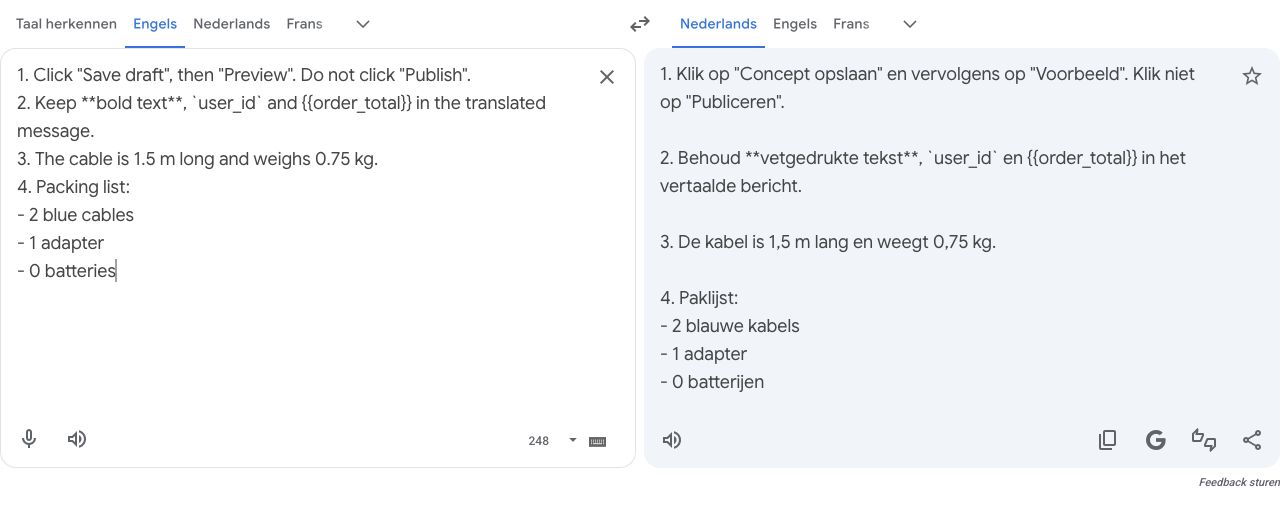
Google Translate: straight quote marks, Paklijst, and all formatting tokens unchanged.
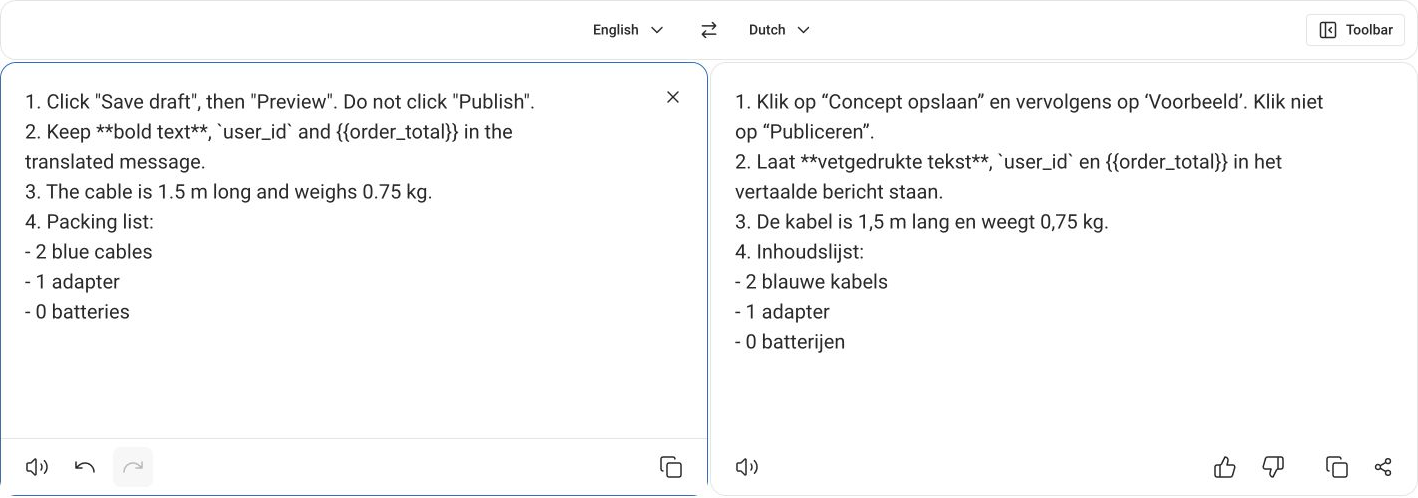
DeepL: mixed quote marks around the button labels and Inhoudslijst for the packing list. Formatting tokens unchanged.
How did they handle gender-neutral wording?
The source "Each customer should check their settings before they continue" uses no gendered pronoun. DeepL made it masculine: Elke klant dient zijn instellingen te controleren voordat hij verdergaat. Google wrote zijn of haar and hij of zij, which avoids the masculine default but is clumsy. A plural rewrite solves it cleanly: Klanten moeten hun instellingen controleren voordat ze verdergaan. In a direct support message, Controleer uw instellingen voordat u verdergaat. is shorter still.
DeepL also offers formality and style controls on its paid plans. We did not test those, so we cannot say whether they would fix the tone issues above.
Can either translator tell a bird from a construction crane?
Only when the sentence stands alone. In English, "crane" is both a bird and a machine; Dutch uses two words: kraanvogel for the bird and kraan for the machine. With the bird sentence on its own, both translators chose kraanvogel. When the bird and the machine shared a passage, both usually used kraan twice, producing a construction crane that spreads its wings.
We started with a deliberately ambiguous pair: "The crane stood beside the river. The crane lifted a steel beam." Both returned kraan twice, which is a fair reading, since a construction crane can stand by a river. So we added clear context:
The crane spread its wings beside the river. The crane lifted a steel beam at the building site.
| Request | DeepL (bird) | Google Translate (bird) |
|---|---|---|
| Bird and machine, first session | kraan (wrong) | kraanvogel (correct) |
| Same passage, second session | kraan (wrong) | kraan (wrong) |
| Machine sentence first, then bird | kraan (wrong) | kraan (wrong) |
| Bird sentence alone | kraanvogel (correct) | kraanvogel (correct) |
Both translated the machine correctly as kraan in every request.
Two details stand out. First, Google's correct answer did not hold: the identical passage later came back with kraan twice. Google Translate was signed in for that second attempt, so conditions were not identical, but the practical lesson is the same: one good result does not guarantee the next. Second, when the machine sentence came first, DeepL wrote De kraan spreidde zijn ‘vleugels’ uit, putting "wings" in quote marks as if they were a figure of speech. It kept the machine reading and bent the bird sentence to fit.
There is also a small fluency point. DeepL's tilde een stalen balk op op de bouwplaats, with op op, is grammatical but awkward. For the machine sentence on its own, DeepL chose the natural word order: tilde op de bouwplaats een stalen balk op.
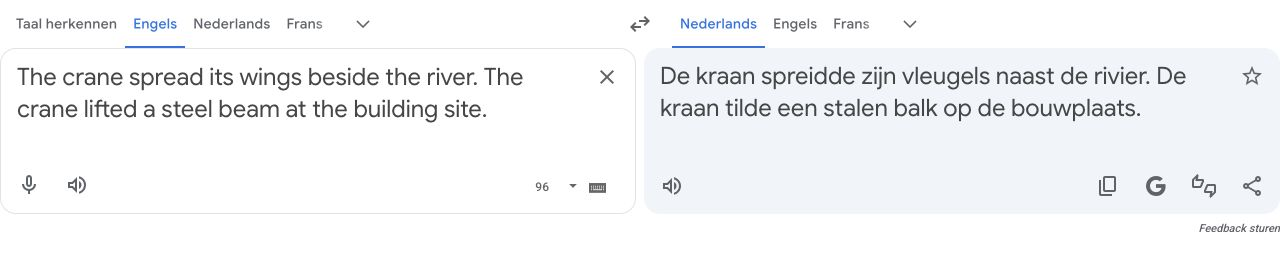
Google Translate, second session: kraan in both sentences, including the crane that spreads its wings.

DeepL, same passage: kraan in both sentences, and the awkward op op.
The lesson for real work: if a word in your text has two meanings, such as a product name that is also an everyday noun, check it in the full message you will actually send. The same sentence can translate differently on its own than inside a longer passage.
Can you paste customer emails into free DeepL or Google Translate?
Not without checking the terms first. We used invented text only. DeepL's privacy policy says content submitted to the free translator is processed "for a limited period of time to train and improve our neural networks and algorithms", and, citing its terms of use, rules out texts "containing personal data of any kind". DeepL Pro has different data terms, but buying a subscription is not a complete data processing assessment on its own.
For Google Translate, review its privacy and account-control guidance alongside your organisation's rules. We did not test the Google Cloud Translation API or its data settings. While you evaluate quality, use invented examples like the ones in this test.
Which translator should a Dutch support team use?
Choose by the kind of text. For internal instructions, policy wording and messages with deadlines, DeepL's closer match to the source is the safer starting point. For customer-facing replies, Google's more natural register needed fewer edits in our cases. Either way, a Dutch speaker should read anything that commits you to a date, an amount or an action.
Before you settle on one, run a short test of your own:
- Build a small test set from your own messages. Replace customer details with invented ones, but keep your real placeholder syntax, conditions and product terms.
- Write down what must survive. List the tokens, amounts, deadlines and required actions before you translate.
- Run the same text through both tools. Note the date, plan and settings, and keep the full output.
- Have a Dutch speaker check meaning, tone and terminology separately. A fluent sentence can still shift a deadline.
- Test the rest of the workflow on its own. Document formatting, integrations and data terms are separate decisions from translation quality.
DeepL is listed in our directory alongside other European AI and language tools, including eTranslation, the European Commission's translation service for public administrations and SMEs. If you are replacing more than one Google product, our de-Googling guide covers the wider move, and the Proton Mail vs Gmail comparison handles the mailbox side.
Frequently asked questions
Is DeepL or Google Translate better for Dutch?
In our English-to-Dutch test, neither was better across the board. DeepL kept instructions and deadlines closer to the English source, while Google Translate produced more natural customer-facing wording and terminology. Both preserved every link, placeholder and number. Choose based on whether precision or tone matters more for the text you translate.
Do DeepL and Google Translate keep placeholders, links and code intact?
In our test, yes. Both returned URLs, email addresses, version numbers, filenames, template placeholders, inline code and Markdown bold markers unchanged. Both did translate the words inside bold markers and the English button labels, so decide beforehand which text must stay in English.
Which translator handled deadlines and conditions more accurately?
DeepL. It kept every instruction and deadline in the same form as the English source. Google Translate turned "Refund the delivery fee" into a statement that the fee will be refunded, and changed "arrive by Friday" to "arrive on Friday". Neither product dropped a negation such as "do not delete" or "will not renew".
Which translator sounds more natural in Dutch?
Google Translate, in most of our cases. DeepL used the formal "Gelieve", added urgency with "zodra" where the English was relaxed, called a packing list an "inhoudslijst" instead of a "paklijst", and mixed quote-mark styles. Neither handled a gender-neutral English sentence well; a plural rewrite fixes it.
Can DeepL and Google Translate tell a bird crane from a construction crane?
Only when the bird sentence stood alone: both then used "kraanvogel". When the bird and the machine appeared in the same passage, DeepL used "kraan" for the bird in all three tests and Google Translate in two of three. Check ambiguous words in the full message you plan to send.
Were DeepL Pro and Google Cloud Translation tested?
No. We tested the free desktop web translators only. DeepL was signed out in both sessions; Google Translate was signed out in the first session and signed in for the second. No paid plan, API, glossary, document upload or formality setting was tested.
Can I paste customer emails into the free translators?
Not without checking the terms first. DeepL prohibits texts containing personal data in its free translator, and its privacy policy says free-service content is processed for a limited period to train and improve its neural networks. Check the service terms and your organisation's rules before translating real customer records with either provider.
Can I reproduce this comparison?
Yes. The article links two JSON files with every English input and Dutch output from both sessions. Translate English to Dutch, record the date, plan and account state, and compare your results. Machine translation output changes over time, so expect some differences.
Related Articles
pCloud vs Proton Drive (2026): Which Is Better?
Compare pCloud and Proton Drive on encryption, lifetime pricing, collaboration, storage, and European data residency before choosing your cloud.
ComparisonsOffice.eu vs Euro-Office: Which European Office Suite Should You Try First?
Two European office suites launched in March 2026 to challenge Microsoft 365 and Google Workspace. Here is how Office.eu and Euro-Office compare on features, sovereignty, and readiness.
ComparisonsTresorit vs Dropbox: End-to-End Encryption vs Convenience (2026)
Dropbox encrypts files on their servers but holds the keys. Tresorit uses zero-knowledge encryption, only you can decrypt your files. Here's the complete security, feature, and pricing comparison.
Ready to Switch to EU Alternatives?
Explore our directory of 400+ European alternatives to US tech products.
